
After a healthy delay, I’ve released Elbee Elgee 1.3 to the Dot Org Theme Repository. I’ve added a few things worth noting.
Tabbed Admin Options
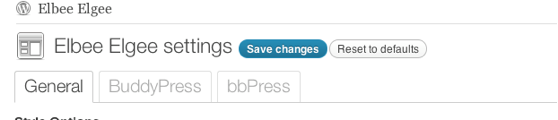
The first change that I’m rather proud of is the inclusion of tabbed admin interface elements. While the code powering this setup could use some optimization and simplification, this tabbed step lays the groundwork for some other exciting features I have planned for forthcoming releases.
As you can see in the screenshot above, Elbee Elgee will now detect whether you have BuddyPress and/or bbPress installed and active and will separate out admin elements relating to their functionality into separate tabs. They’re simple examples but they demonstrate the power of this approach.
The Beginnings Of Theme-Wide PHPDoc Documentation

I’ve started documenting the ins and outs of the master parent theme in an effort to both assist my lousy memory and to give pointers to users and (hopefully) other theme devs that choose to use Elbee Elgee as a basis for child themes. All files that originated in this theme should eventually have a PHPDoc doc block at their top and all functions will eventually have associated doc blocks as well.
This is very much a work-in-progress but I hope to have the theme thoroughly documented within the next couple of revisions.
BuddyPress 1.5 Support
The recently-released BuddyPress version has radically changed the way many of BP’s core functions work. I’ve adjusted the included theme templates included in Elbee Elgee to compensate for this and am fairly confident that this theme is one of the few freely-available themes out there to offer such.
bbPress 2.0 (Final) Support
There have been some minor revisions in support for bbPress. Not much changed between 2.0 betas and the final release, so not much has changed internal to Elbee.
bbPress Single-Column Layout Support
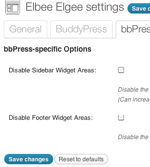
Tucked away in the new bbPress tab you will see the options shown at right.
Previously, theme users employing 2- and 3-column layouts were potentially constrained in their forum views. Personally, I feel like bbPress tends to feel a bit “cramped” in the cases where it has to contend with sidebars.
In order to address this, I added the ability to disable the default sidebars and default footer widget areas.
Check out the examples below for a taste of what I’m talking about.
Regular Layout

Here we have an example of the standard 2 column layout.
No Sidebars

And here’s what it looks like without sidebars. Much breezier, no?
No Nothin’

Here we have both sidebars and footers disabled, for those who really dislike widget areas cramping their style.
CSS-Only Drop-Down Multi-Level Menu Support

Previously, Elbee Elgee had no support for drop-down/multi-level navigation menus, so I simply limited the main menu display to the top level. However, version 1.3/1.3.1 have addressed this flaw in the default stylesheet (ng.css). This menu setup should work in all modern browsers — no JavaScript needed. Please let me know if you find otherwise.
1.3 And 1.3.1? Huh?
1.3, the version currently available in the WordPress.org theme repository, actually contains a small bug that will incorrectly limit layout options if you have bbPress enabled. I’m in the process of getting 1.3.1 approved and your auto-updaters should pick up the update as soon as it’s cleared by the Theme Review Team.
In the meantime, if you want to grab a copy of 1.3.1 to install directly:
- Click over onto the Bitbucket download.
- Unzip the zipfile. This should create a directory
zamoose-elbee-elgee-0e0b34ec56d6. - Rename
zamoose-elbee-elgee-0e0b34ec56d6/toelbee-elgee/. - Remove/set aside your existing
elbee-elgee/directory underwp-content/themes/. - Upload that local
elbee-elgee/directory to yourwp-content/themes/directory. - Visit the theme settings page and make sure that everything seems correct.
Issues? Problems? Bugs?
As always, please drop me a line in my support forums. Thanks!



Many many many thanks for your great theme.
I’ve one question.
Is it possible to change the effect from slide to fade?
How can I do this?
Thanks for your patience and your support.
i have same question
is it possible to change the effect from slide How can I do this?
Thanks for your patience and your support.
Nice share. Can you update your tutorials for new version?
Thank You, I Like but Can you update your tutorials for new version?
Thank you, can you update the tutorial for the new version? I’m waiting for it
Thank you sir, but its old version. Can you update for the new version in 2021 ?